Chrome extension
PineTune
TradingView strategy optimizer
Pick the inputs, set ranges, choose an objective and filters. PineTune changes the inputs in your own Strategy Tester, waits for each backtest, records every metric and ranks what survives.
| # | inputs | net | PF | DD | trades |
|---|---|---|---|---|---|
| 1 | ATR 12 · Factor 3.4best | +48.2% | 1.92 | 9.8% | 84 |
| 2 | ATR 14 · Factor 3.2 | +45.7% | 1.88 | 10.4% | 91 |
| 3 | ATR 12 · Factor 3.6 | +44.9% | 1.95 | 11.1% | 77 |
| 4 | ATR 10 · Factor 3.4 | +41.3% | 1.71 | 12.6% | 102 |
| 5 | ATR 16 · Factor 3.0DD > 15% | +52.8% | 1.64 | 24.9% | 118 |
Sound familiar?
- Five, ten, fifteen inputs, and you are still changing them one at a time.
- You found settings that look fine, but have no idea if something better was one click away.
- Higher profit means deeper drawdown; balancing metrics by gut feel never works.
- Re-checking the same strategy on BTC, ETH, gold and AAPL takes an afternoon.
- You want to queue a batch before bed, but TradingView has no built-in optimizer.
How it works
- 01
Detect inputs
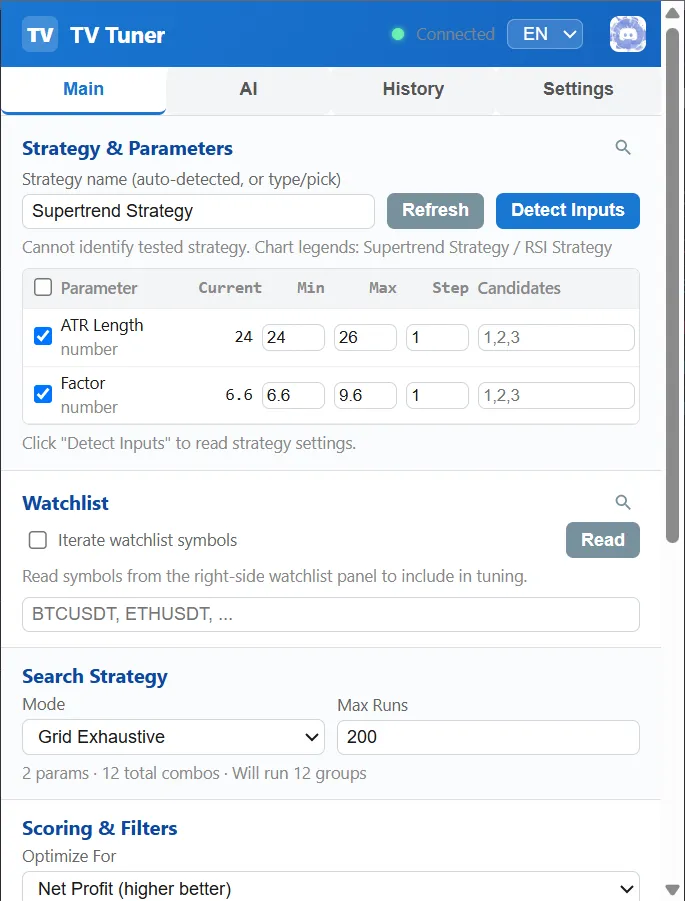
PineTune opens your strategy settings and lists every number and boolean input.
- 02
Set the search
Tick the inputs to sweep, give a range or explicit candidates, pick grid, random or coarse-to-fine.
- 03
Objective and filters
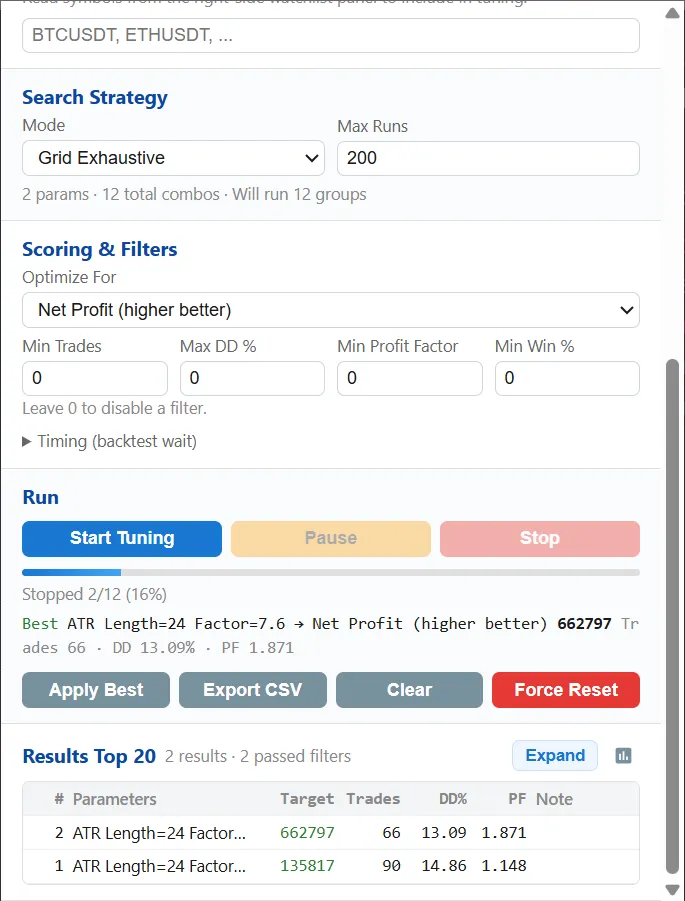
Optimize net profit, Sharpe, profit factor and more while rejecting anything over your max drawdown or under your minimum trades.
- 04
Run, rank, apply
Close the popup. The run continues. Come back to a ranked table, apply the best settings or export CSV.
Everything a serious tuning session needs
Three search modes
Exhaustive grid, random sampling for huge spaces, and coarse-to-fine that zooms in around the top candidates.
Objectives and hard filters
10 objectives including Sharpe, Sortino and max drawdown %, plus min trades, max DD, min PF and min win-rate filters.
Multi-symbol robustness
Iterate your watchlist and see whether the settings hold up beyond the one chart they were fitted on.
Runs in the background
Close the popup, switch tabs. An in-page HUD shows progress, and results persist locally.
CSV export and history
Every combination with every metric, ready for Excel or pandas. Past runs are kept for comparison.
AI review (BYOK)
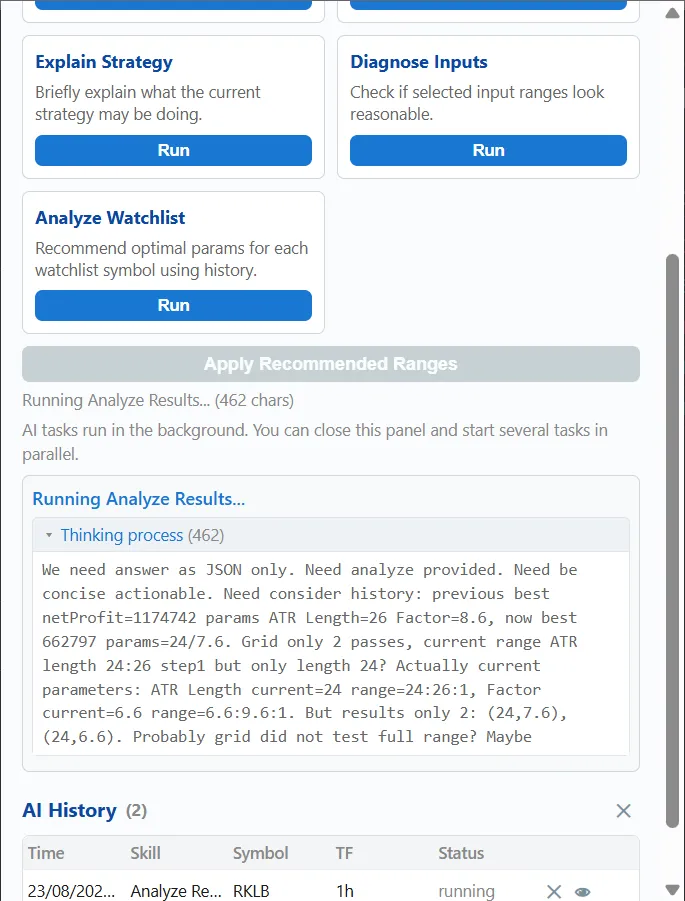
Ask your own LLM to critique the results and propose the next ranges. Your key, your provider, called from your browser.
Pine source loop
Read, edit, save and re-backtest the Pine code itself; compile errors are detected before the run continues.
Ultra local API
A 127.0.0.1 bridge plus an Agent Skill so Claude Code, Codex or Devin can drive the whole loop.
12 languages
The interface is available in English, Chinese, Spanish, Japanese, Korean and seven more languages.
Inside the extension
Why not just…
| Manual testing | Free optimizers | PineTune | |
|---|---|---|---|
| Tests inputs automatically | ✗ | ✓ | ✓ |
| Drawdown and trade-count filters | ✗ | Some | ✓ |
| Multi-symbol robustness | ✗ | Rare | ✓ Pro |
| Edits and re-tests Pine code | ✗ | ✗ | ✓ Pro |
| AI agent can drive it | ✗ | ✗ | ✓ Developer |
| Data stays in your browser | ✓ | Varies | ✓ |
| Time for 1,000 combinations | ~40 h | Overnight | Overnight |
Built to avoid the lucky-parameter trap
The best-looking backtest is often the most overfit one. PineTune rejects results that fail your risk filters, lets you check the same settings across several symbols, and keeps the full result set so you can look at neighbourhoods instead of single peaks.
Requirements
- Google Chrome, or a Chromium browser that installs from the Chrome Web Store
- TradingView web app: the chart page, not the desktop app
- A Pine strategy loaded on the chart with the Strategy Tester available
- Only number and boolean inputs are swept; dropdown inputs are detected but kept fixed
Pricing
Free
See it work on your own strategy.
- 2 inputs at a time
- Up to 50 backtests per run
- Grid and random search
- 1 filter + objective
- Top 10 results
Basic
Automate the parameter sweep, export everything.
- Unlimited inputs and backtests
- Coarse-to-fine search
- All filters and objectives
- Full results, CSV export, history
- Email support · 2 devices
Pro
Most popularRobust settings, not lucky ones.
- Everything in Basic
- Multi-symbol / watchlist robustness checks
- AI review and tuning advice (bring your own key)
- Jev in-loop advisor
- Pine source edit and re-backtest loop
- Priority email · 3 devices
Developer
Let your coding agent drive the lab.
- Everything in Pro
- Ultra local API (127.0.0.1 bridge)
- Agent Skill for Claude Code, Codex, Devin…
- Event stream and waitDone for unattended runs
- Priority support + Discord dev channel
Try every Pro feature free for 14 days
Grab a trial key in our Discord. No credit card. When it ends you drop back to Free, nothing is deleted.
Frequently asked questions
Is PineTune made by TradingView?
No. PineTune is an independent product by Ticklogits Labs and is not affiliated with, endorsed by, or sponsored by TradingView.
Does it use a TradingView API or need a paid TradingView plan?
No API is used. PineTune works in your own browser by changing inputs in the Strategy Tester you already have open, the same clicks you would make by hand. Any TradingView plan that gives you the Strategy Tester works; longer history (e.g. Deep Backtesting) depends on your own plan.
Can using it get my TradingView account restricted?
Possibly. TradingView’s rules say its features are intended for manual use and discourage automation via extensions. Every tool in this category carries that risk. PineTune uses conservative timing by default, but we cannot promise any outcome. Please read TradingView’s terms and decide for yourself.
Where does my data go?
Nowhere. Settings and results live in chrome.storage.local on your machine. The optional AI review sends requests directly from your browser to the provider you configure, with your own key.
How long does a run take?
Each combination is a real Strategy Tester backtest, so it depends on your strategy, timeframe and history length, typically a few seconds per combination. Coarse-to-fine and random search help keep large spaces practical.
Will the best result make money live?
Nobody can promise that. Backtests are hypothetical and past performance is not indicative of future results. Use filters, multi-symbol checks and out-of-sample periods to reduce overfitting.